Jock Stewart (I’m a Man You Don’t Meet Every Day)

Centuries before the Dropkick Murphys screeched out the syllables to “Kiss Me, I’m Shitfaced” — a song ripe with tales of chest-beating and one-up-manship — there was “Jock Stewart,” the original bragger’s ballad.

Also known as “I’m a Man You Don’t Meet Every Day,” the song has a somewhat convoluted history. The interwebs tells us that the tune was originally Irish, but then made its way over to Scotland where it evolved into the popular drinking song we know and love today. However, there’s also a chance that the tune actually originated in Scotland, came to Ireland during the colonization of Ulster, and then went back to Scotland. Yikes!

Gorillastrations: If at First You Don’t Succeed … Keep Designing Gorillas

Gorilla-Test-BardOfBoston-03As part of my ongoing efforts to learn the ins and outs of Adobe Illustrator, I recently took part in a logo design contest for a company called “Gorilla Test.” The prompt was simple: design a masculine-looking, easily recognizable gorilla that could serve as a mascot/icon for the business.

Needless to say, my logo designs didn’t get picked. But, then again, winning really wasn’t the point of this exercise. I’m just starting out in Illustrator, and the more fun little projects I can bang out on the weekends, the better I’ll get. (Or, at least that’s the plan).

For my fellow Illustrator rookies out there, never underestimate the power of tutorials. Here are 100: Get to it!

Now, onto the designs …

→ ♣ ←

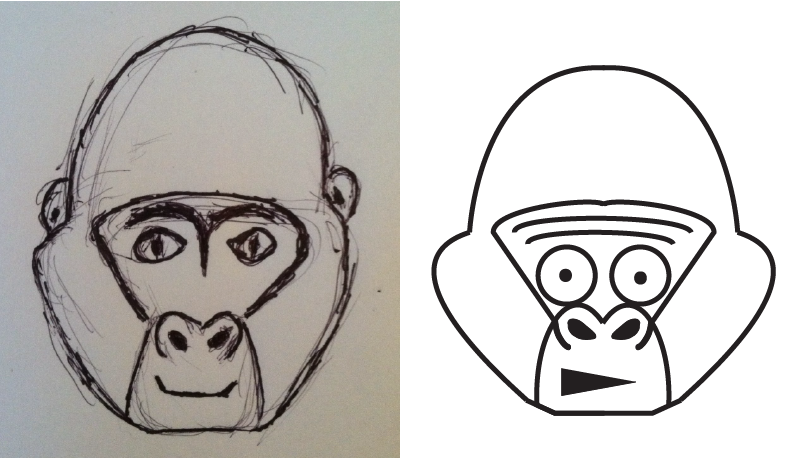
First, let’s have a laugh at my very first logo concept, which came out absolutely TERRIBLE. Somehow, I was able to take a crappy sketch and make an even crappier illustration.

GORILLASTRATION-02-01Gorilla Test-03

→ ♣ ←

Taking heed of how ridiculously awful these first iterations were, I tried to tweak them a bit. The results (below) weren’t any better.

Gorilla Test-04

→ ♣ ←

But, as my parents always told me, “If your first gorillastration is shit, design a new gorilla.” So I did just that.

My sketch, as you can see below, was pretty crappy (especially in the face region). Fortunately, I had a great solution for that: don’t give the gorilla a face.

GORILLASTRATION-01

→ ♣ ←

I’ll now leave you with a few logo iterations based on the above gorillastration. While I didn’t fall in love with any of the end results, I did get a lot of practice creating custom shapes with the Pen Tool and messing around with different color palettes.

Leave me a comment if you have any tips, suggestions, criticisms, or grievances. And, until next time, happy illustrating.

Gorilla-Test-BardOfBostonGorilla-Test-BardOfBoston-02


Gorilla-Test-BardOfBoston-05
Gorilla-Test-BardOfBoston-03Gorilla-Test-BardOfBoston-04

Lightin’ It Up: How to Illustrate a Sketch in Adobe Illustrator

lighter-sketch-illustrated-adobe-illustrator

Hang around with a bunch of amazing graphic designers all day, and I promise you: you will eventually become envious of their seemingly magical skills.

And as talented as these folks are, even they point to other design work and say, “Holy crap, look how amazing that is! How did they do that?”

→ ♣ ←

This video was making the rounds among the design team a few weeks ago: It shows the painstaking process of hand-drawing a poster and then (and this is where the magic comes in) illustrating it on a computer, i.e. converting that drawing into a vector graphic and colorizing it.

I was dumbfounded.

In order to illustrate the elephant/mammoth he had drawn, the artist had to create dozens upon dozens of custom shapes. These shapes made up the various segments of the elephant/mammoth’s body. He then filled those shapes with colors and gradients and applied textures and effects to produce the incredible, mosaic-like end result.

→ ♣ ←

Sooo I’m not that good. Not even close. As of the time of this writing, I’ve been messing around with Illustrator for approximately 2-3 weeks.

But you gotta start somewhere. So, here’s what I did …

→ ♣ ←

1. Learn How to Draw (Then, Draw Something)

I learned how to draw about 4 months ago, so I had this first step out of the way.

I mean, I could already draw before 4 months ago, but I had never actually learned how to draw up until that point.

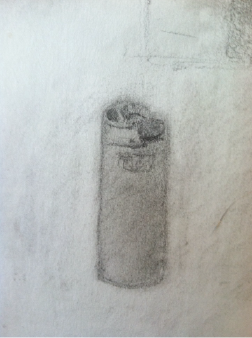
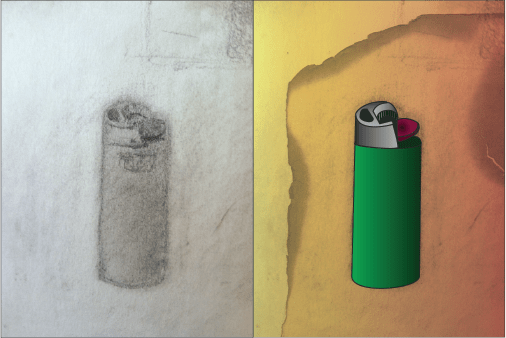
lighter-sketchIt’s funny: of all the useless crap that we’re forced to learn in school … how many of us ever got solid instruction on the basics of drawing?

Do yourself a favor: Read Drawing on the Right Side of the Brain, or better still, get the Drawing on the Right Side of the Brain workbook. You’ll soon understand that drawing is a learnable, teachable skill, and not something that only some people are born with.

More specifically, you’ll learn the basic component skills that make up the global skill of drawing, which are …

  1. Perceiving edges (where one thing ends and another beings)
  2. Perceiving spaces (what’s beside and beyond)
  3. Perceiving relationships (seeing in perspective and in proportion)
  4. Perceiving lights and shadows (seeing degrees of values)
  5. Perceiving gestalt (seeing the whole and its component parts)

As you can see by my pretty “meh” drawing of a lighter above, I’m no pro. But hey, I’m-a-learnin’.

→ ♣ ←

2. Scan & Upload Your Drawing

I used a free iPhone app to scan my drawing (and then emailed it to myself). If you have access to an actual scanner, you’ll probably get better results.

Once you have your scanned drawing saved to your computer, open it in Illustrator.

→ ♣ ←

3. Learn How to Use the Pen Tool (Then, Use It)
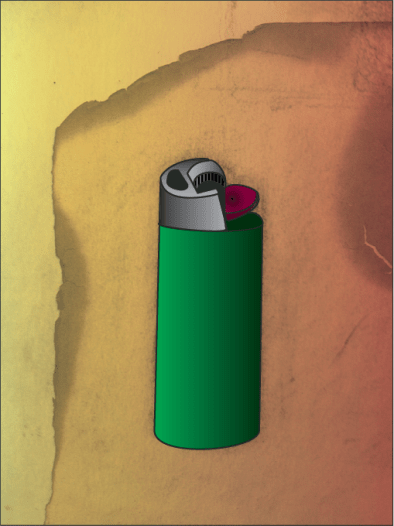
lighter-illustrated

This was the toughest part. At first glance, the Pen Tool seems easy: Just click, move, click and POW you have a straight line.

But what about curved lines? And how do you create shapes that have both straight and curved lines? And how do you make sure you’ll be able to fill the shape you’re creating with a color or gradient?

Great questions. The answers are here on the Adobe site. I recommend giving that stuff a read. Then, hop into Illustrator and start messing around.

For me, despite theoretically understanding the Pen Tool, I wasn’t really able to grasp how all of its functions worked until I had done a little trial and error work.

Once you’ve got the hang of it, start creating shapes over top of your drawing (you’re effectively tracing it). You’ll want a separate shape for each of your drawing’s components. That way, you can fill them individually with specific colors/gradients.

FYI: For my lighter illustration, I used a 2-pt. stroke weight, then filled in the vast majority of the resulting shapes with gradients in order to recreate the shading in my drawing.

→ ♣ ←

And that’s pretty much it.

When I was happy with the design of my lighter, I messed around with the background a bit. First, I added a yellow-to-orange gradient layer, and used the “multiply” opacity setting to have it really blend in with the paper from my scanned drawing. Then, I added a burnt paper texture over top of that, again using that “multiply” opacity setting.

It ain’t perfect, but it’s a start.

→ ♣ ←

If you have any Illustrator tips, tricks, insights, voodoo, etc. you want to share, definitely leave a message in the comments section below.

Happy illustrating.
Learning Adobe Illustrator, Day One: Loco for Logos

devaney-music-logo-1I’ll cut to the chase: I’m learning Illustrator because I’m jealous of my friend/coworker Tyler Littwin’s awesome design work. Tyler’s go-to design tool is Illustrator, which means it’s time for me to graduate from hacking together graphics in PowerPoint, Keynote, Canva, and the like (although, admittedly, those tools are great for a lot of basic design work).

At first glance, Illustrator — like other programs in the Adobe Creative Suite — can seem incredibly daunting. So many menus and options and weird-looking icons … it’s enough to send an aspiring designer running.

Fortunately, there are a ton of tutorials out there on the interwebs that can help. I found this video particularly helpful for learning the basics of Illustrator, such as creating shapes, formatting text, adjusting colors and gradients, and adding drop shadows and other effects.

Below are some of my first-ever Illustrator creations (they’re logos for my family band website). Let me know what you think!

devaney-music-logo-6

devaney-music-logo-5

devaney-music-logo-4

devaney-music-logo-3

devaney-music-logo-2

devaney-music-logo-1

And here are some (mostly hideous) designs I created for my girlfriend’s fictitious school that teaches kids how to (you guessed it) cook and code.

cook-and-code-4

cook-and-code-3

cook-and-code-2

cook-and-code-1

10 Tunes to Get Your St. Patrick’s Day Celebration Started Early

Many moons ago, before I joined the Boston startup scene, I was part of the Montreal pub scene, where I regularly banged away on the Irish bouzouki with my band, Devaney’s Goat.

As Montreal’s premier “drinking band with a Celtic problem,” there was no shortage of Spinal Tap-esque antics and Fleetwood Mac-style romances. But through all the drunken chaos, Devaney’s Goat actually made some pretty damn good Celtic music.

To help get everyone prepared for St. Patrick’s Day, I’ve opened up the Devaney’s Goat vault and have put together a playlist of 10 live recordings from 2009-2010. (Bonus track #11 is a recording of me dealing with a heckler … and, of course, by “heckler” I mean “a guy who requested a song that we didn’t know”.) Enjoy!

I Made an Animated GIF (And So Can You!)

Devaney's Goat on local TV in Montreal (with a zoom in on yours truly!)

Ah, yes. The animated GIF. It’s the perfect medium for giving your already caffeine-addled brain a bit more stimulation, for adding some excitement to stale company HipChat conversations, and for giving your emails a bit of flair (15 pieces minimum). << And yes, that will be the only awkward Office Space reference I make in this post.

Instead of turning to Reddit, Señor Gif, or a Tumblr page the next time you’re in the market for an amazing animated GIF, why not create one yourself? As you’ll soon discover, the process is quite simple…provided you’re a musician and have access to a time machine.

  • Step 1: Move to Montreal and start a Celtic/folk band. Assuming you can already sing and play the Irish bouzouki, you’ll need (at least) one Russian guitarist, a fiddler from the Pacific Northwest (bonus points if her uncle was in the Monkees), a British Columbian drummer boy, and a pair of Ontarian lovebirds who — between them — can play the upright bass, the accordion, and the trumpet.
  • Step 2: Go back in time to St. Patrick’s Day 2010 and get a gig at an Irish pub. When the local news crew comes around with cameras, make sure your scally cap is on straight and that your cheeks are an appropriate shade of crimson.
  • Step 3: Steal Borrow the footage from the news channel’s website.
  • Step 4:  Upload that footage to Imgflip (or a similar site) and follow the instructions for cropping/trimming.
  • Step 5: Share your animated GIF with the world and instantly become an Internet celebrity.*

And there you have it, five simple steps for creating an amazing animated GIF. Of course, you could skip steps one through three and simply upload a video you’ve taken yourself. (But I highly recommend the time machine route.) Until next time…Creativity is contagious. Pass it on.

*In the eyes of your mom.

Tipping the Scales: How to Spend More Time Creating Than Consuming

Watching Breaking Bad, listening to Van Morrison radio on Spotify, reading the latest Clive Cussler novel (he’s the king of Indiana Jones-esque historical fiction/adventure, in case you were wondering), perusing a MarketingProfs or Content Marketing Institute post, eating buffalo chicken nachos at the Irish pub down the street…these are all examples of content consumption.

Hold up. Buffalo chicken nachos? Content? But of course. Someone cooked the chicken and chopped the jalapenos and combined those ingredients to produce something with tremendous value. Spicy, delicious value. As consumers, we stare in awe at the glistening cheese, we smell the fiery buffalo sauce, we hear the tortilla chips crack and crunch, and we feel the greasy goodness on our fingertips.


Oh yeah, and we eat them. And they’re flippin’ tasty.

Alright, back on track. The point I’m trying to illustrate here is that it’s easy to get addicted to consuming content. And for good reason: There is a ton of content out there. You could easily fill out several lifetimes trying to consume all of the content that’s been created by your favorite authors, musicians, podcasters, chefs, etc. Don’t get me wrong: Consuming content is a good thing. It teaches us, it entertains us, it inspires us. But if we dedicate ALL of our free time to consuming, how are we supposed to get good at creating?

Practicing Creativity Will Make You a Better Content Creator

By cutting consumption and increasing production, we can all become more efficient and prolific content creators. How many of us spend between 75 percent and 100 percent of our free time consuming?  We’re watching YouTube clips, we’re listening to music, we’re ordering pizza, we’re buying a clock made out of driftwood on Etsy. Why aren’t we recording our own videos, or making our own music, or baking pizza from scratch, or learning new skills so we can complete fun projects?

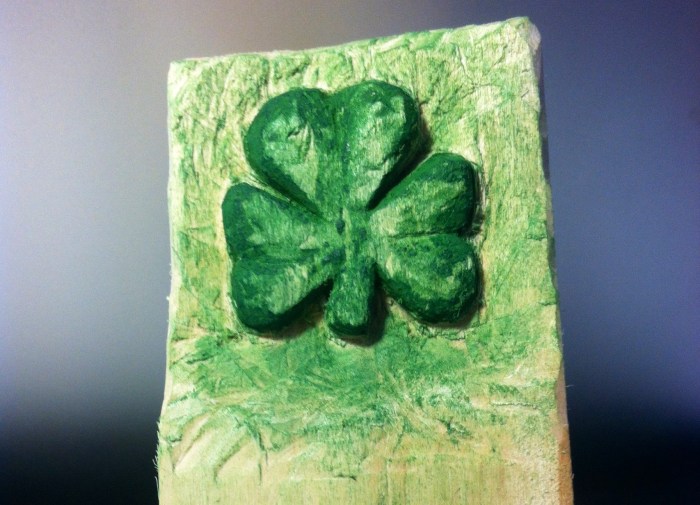
Shamrock Relief Carving Sit Down and Whittle Some

Worried that my brain was slowly eroding into mush, I decided to make a conscious effort to tip the scales…to create more than I consume. In addition to devoting more time to the creative activities I know best (playing music, writing, cooking), I also decided it was important to learn something new: I wanted to add a new category or channel to my creative repertoire. So, one Saturday morning I walked down to the hardware store, bought some woodcarving knives, bought a few blocks of wood, and whittled me something fierce. (And by “whittle me something fierce” I mean I Googled how to do basic relief carving and then carved a shamrock.)

I learned a lot that weekend. For example, I learned that woodcarving is a very precise art that requires extreme concentration and a very, very steady hand. This ties into another lesson I learned: woodcarving knives are sharp. Really sharp.

The finished product isn’t perfect, but that doesn’t matter. I didn’t carve my shamrock to to sell it, or to have it judged by a panel of art critics. I carved it so I could enjoy the process of carving it.

Now, if you’ll excuse me, it’s time to make some buffalo chicken nachos.

The Greatest Gig You’ll Ever Play

Dock_at_white_lake_manitobaYou’ll be on a dock. The wood creaking beneath your flip-flopped feet. Lake water lapping against the shore. Campfire smoke in your lungs.

A ring of chairs: plastic, metal, Adirondack. Faces peeking out through the darkness. An old face. A young face. A face you see often. A face you haven’t seen for years. You’ll strum the rusty strings of a borrowed guitar.

Each song will awaken a memory. A stubbed toe. A backyard football game. A friend’s treehouse. A bookstore. A car crash.

You’ll pull a fresh beer from the cooler and continue leading the choir. Beatles. Van Morrison. An Irish folk song from centuries ago. Afro-Man. Tupac. Wait, what? It doesn’t matter. It’s all part of the drunken symphony.

Bob Marley’s “No Woman, No Cry.” Of course! But the spontaneous round singing that will erupt toward the end of the oft-sung song? An unexpected harmonic delight.

Some will belt the chorus, some will call out, “Hey, little sister, don’t shed no tears,” while others will reassure the group with, “Everything is gonna be all right.” It will all blend together seamlessly. A perfectly knitted moment.

Midnight will roll lazily by. The campfire embers will hiss with fatigue. You’ll hand the guitar back to its owner.

“Back in a sec,” you’ll say to the choir.

But then you’ll secretly make your way up to the house, hand-in-hand with a familiar face.